
Jump to a section
Contact Us On Signal
Use the direct link, scan the QR code, or open Signal and search for the exact username. If the link does not open your app, the manual search path still works.
Signal username: fftac.01
Open Signal, start a new chat, and search the exact username including the digits.
Open Signal contact link (opens in a new tab)
Use the Signal link to start a message request to FFTAC. Signal may open directly, or it may show install/open instructions first.
Send a short first message
State who you are, what you are asking about, and whether you need a reply by another channel.
Scan The QR Code
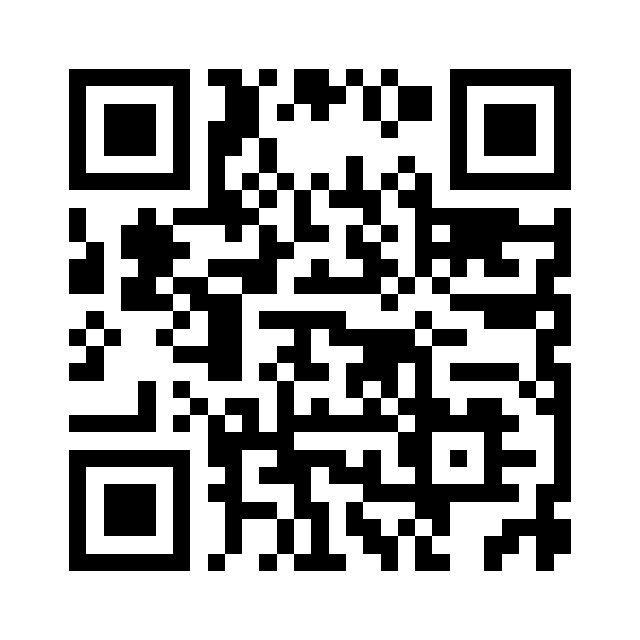
The QR code points to the same public Signal contact path. It is provided for mobile users who would rather scan than type the username.
If the QR code does not resolve on your device, open Signal manually, start a new chat, and search for fftac.01.
Why Signal Is The Right Contact Channel
Signal is built for end-to-end encrypted messaging and calls. That makes it a better first-contact channel for people who want to ask questions, share a source trail, or start a careful conversation without pushing the exchange into a public social platform.
Signal usernames make contact easier while reducing reliance on a public phone number. The username is a routing path for starting a conversation, not a public social profile and not a guarantee of identity.
- It supports private, end-to-end encrypted messages by default.
- It lets FFTAC publish a contact username instead of making a phone number the primary public identifier.
- It gives unknown contacts a message-request path, so first contact can be reviewed before a conversation continues.
- It works across common mobile and desktop environments for people who already use Signal.
How To Write The First Message
- Start with the reason for contact: question, correction, source, interview request, collaboration, or site issue.
- Include one concise paragraph of context before sending files, links, or long material.
- For source corrections, name the page and the claim being corrected.
- For urgent operational matters, also use email so there is a durable administrative trail.
- For legal notices, takedown demands, subpoenas, financial matters, or account access issues, use email or another formal channel instead of Signal alone.
What Signal Does Not Solve
Signal protects the communication channel, but it does not verify real-world identity by itself. If a conversation becomes sensitive, verify identity through another trusted channel before relying on the exchange.
Signal also does not replace records that need to be retained for administrative, legal, financial, or publication decisions. Use Signal for careful first contact and private discussion; use durable records where a formal record is required.
Signal Safety Practices
Keep Signal updated, check that you are contacting the exact username, and do not trust any request for verification codes, Signal PINs, recovery keys, passwords, or payment credentials.
- Use the exact username: fftac.01.
- Do not share SMS codes, Signal PINs, backup recovery keys, private keys, or passwords in any chat.
- Use disappearing messages when the discussion should not become a long local archive.
- Use a separate formal channel for anything requiring a permanent public or legal record.
Fallback Contact
Signal is the preferred private-first channel, but it is not the only path. Email remains available for formal requests, accessibility needs, legal records, and people who cannot or do not want to use Signal.
Email FFTAC
Use email when a durable administrative record matters or when Signal is not available to you.
Browse the FAQ first
Many first questions about the name, symbol, and Non-Designation boundary are answered publicly.
Further Reading
Signal Documentation
Official references for usernames, phone-number privacy, safe use, and call links.